2026 Season
When we started developing this season we did not have a host selected. Luckily, we have a connection at Middlesex Community College and the school was excited to host the competition. Here’s the thing: they’ve never had a team compete and are a community college. (Four-year colleges 😅)
Due to the delayed host selection the black team took the liberty of selecting the main competition theme. Initially, we were thinking of doing something purely in the restaurant industry, but it lacked CCDC worthy technology (sorry no smart air fryers). We settled on an MSP (ChefOps) that serves the hospitality industry.
Infrastructure Setup
Similar to the last few years, there were no major changes to how we build and deploy our environments. We’re using Packer and Ansible to build the initial images used across all teams, Terraform to deploy everything, and then Ansible again to run any team specific configuration.
The team has gotten everything working so well that we’re deploying the entire competition infrastructure the morning before the competition instead of the night before. We might be playing with fire, but I’d rather get up early than go to bed late.
One technology I used more this year was developer containers. The main Teleport server running Ubuntu 16.04 (Python3.5) is not compatible with recent Ansible versions. Additionally, I have an issue that when I run a Windows Ansible playbook it causes the python interpreter to crash (probably a mac issue), so I use a dev container for that as well.
This year we wanted to have a heavier network, so we set up IPv6.

IPv6 Adoption:
- Czech Republic IPv4 shutdown date
- Google IPv6 adoption statistics
As much as it seems inevitable some crgitical still don’t support it.
Also running into a bug in Python from 2007 feels bad.
Overall between IPv6 and very integrated systems, it’s one of our complex environments yet.
Deploy your own NECCDC! We have a public version of our internal repository available on GitHub (neccdc-2026-public).
Give a man a fish, and you feed him for a day. Teach a man to fish, and you feed him for a lifetime
Do you have questions about our infrastructure, how it’s set up? We can answer in the NECCDL Discord or by contacting me directly.
If you’re interested in volunteering, check out https://neccdl.org/volunteer/black-team/
Qualifiers
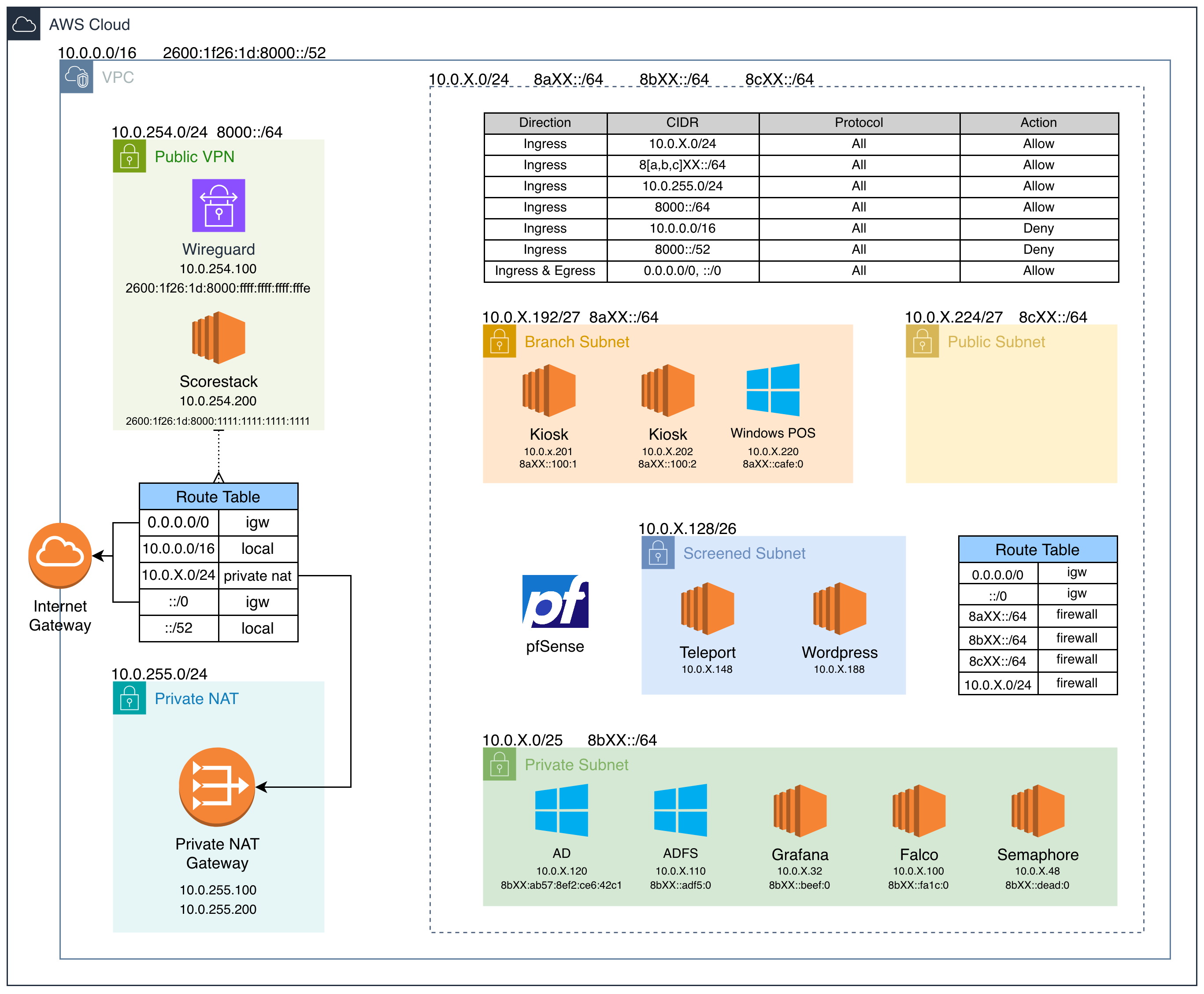
Last year I commented about /22 subnets…
…so this year teams got /64 IPv6 subnts (264 so 18,446,744,073,709,551,616 IPs)
Falco
This server served two main purposes:
- Store Falco rule files and have them accessible over FTP
- Running Falcosidekick and its UI. Alerts were forwarded to a Discord webhook
The falcosidekick-ui project is inactive and the GitHub releases don’t have the latest changes. So in the Ansible build step I checkout the entire project and build it from scratch.
pfSense
I’m not sure how he did it, but Andrew Iadavaia did some more wizardry getting pfSense set up with IPv6. Additionally, he figured out and troubleshooted a bunch of the AWS setup for this: asymmetric routing, edge-associated route tables, and more.
Regionals
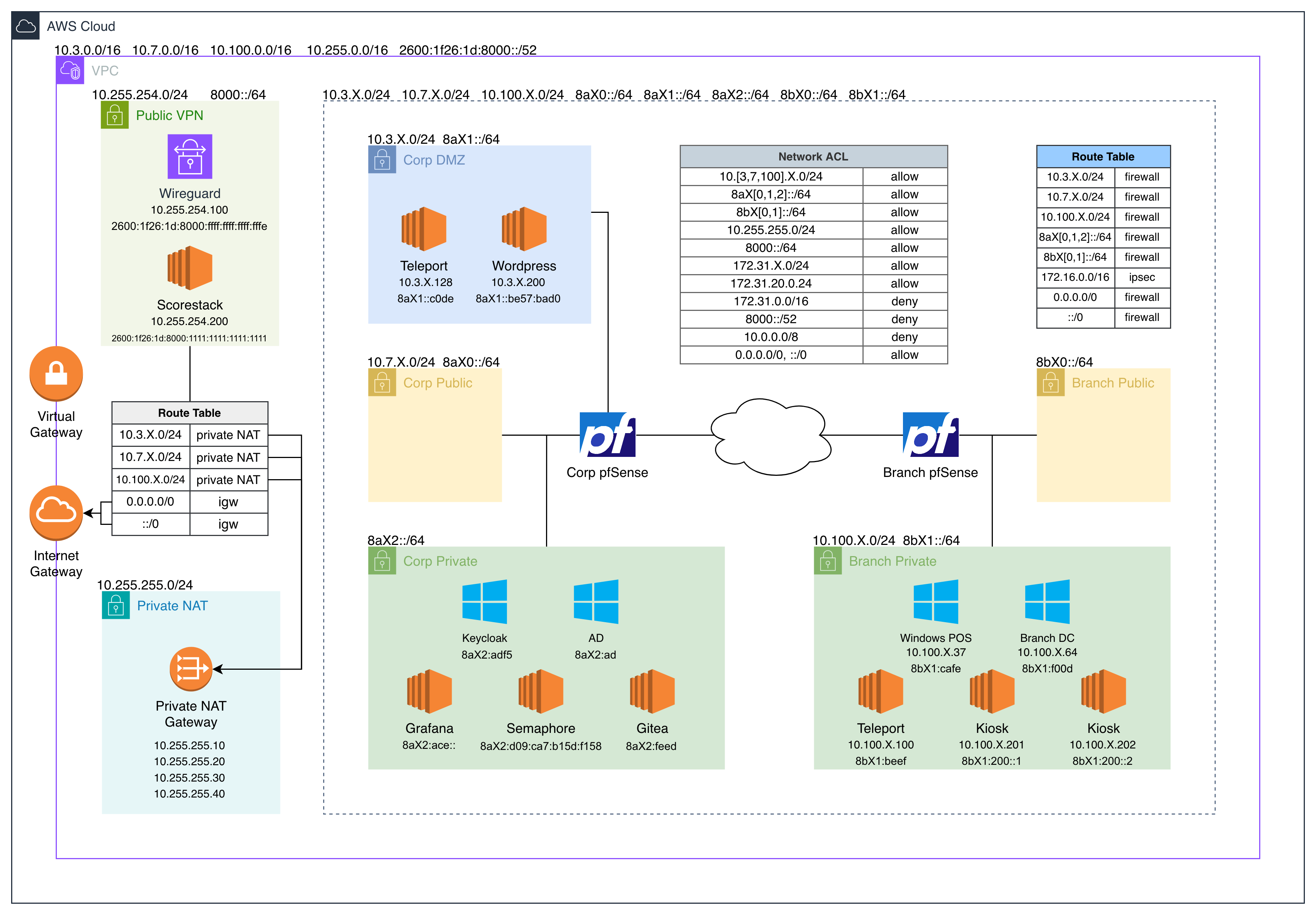
We took the qualifiers environment and expanded it a bit.
The branch subnet turned into its own unique environment: pfSense, DC, & Teleport. Even though both companies’ (ChefOps & OCK) environments were within our AWS VPC, the network path between them technically was routable over the public internet.
Gitea
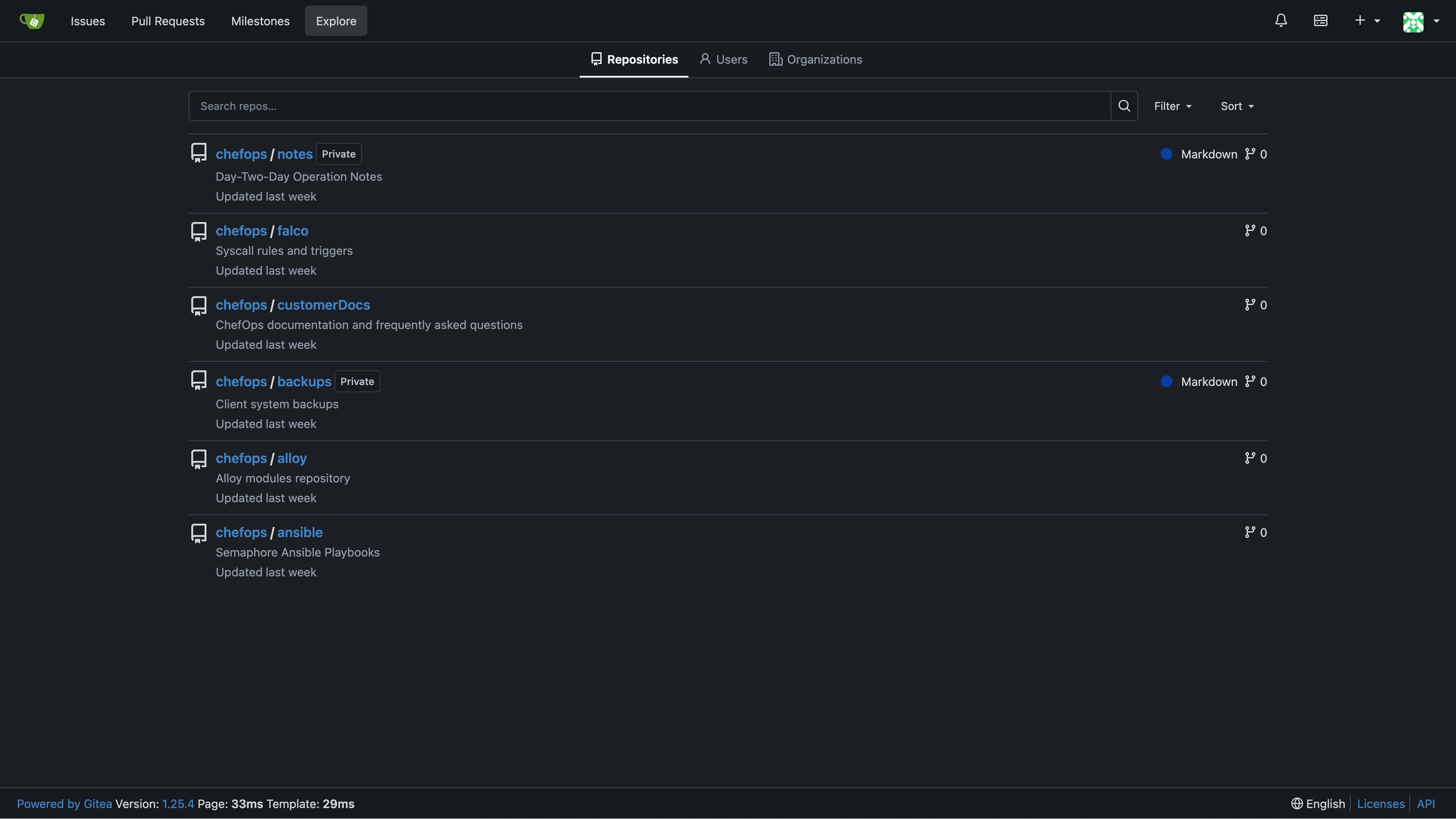
This server was added for regionals to store Ansible playbooks used by Semaphore and Falco rules. One of the scored checks cloned a git repository and if the head commit hash differed the check would fail. Initially, I set it up on an Alpine server but after discovering that Teleport and Falco don’t have musl binaries I switched to developing on a RHEL server.
Grafana
The Falco alerting capabilities from qualifiers were brought into Grafana. Falco on Linux hosts would write alerts to a file that was being monitored by Alloy, they would then be forwarded to the main Grafana server and queried in Loki.
One thing I discovered was that Docker would break IPv6 unless certain sysctl flags were updated. Then cloud-init would overwrite those files on startup unless explicitly disabled. Fun to troubleshoot 🙃
Kiosks
This was just a light weight nginx server with ChefOps security tooling installed. It represented a physical machine that would be accessible in a client’s infrastructure.
Semaphore
I had fun setting this one up and added a lot of cool features to it for regionals. For all the playbooks it would connect to Gitea to fetch them from a repository, during the qualifiers they were only stored locally.
The server never had direct SSH credentials to any other server; all access went through Teleport. Tbot was installed allowing programmatic SSH access with Ansible.
Teleport
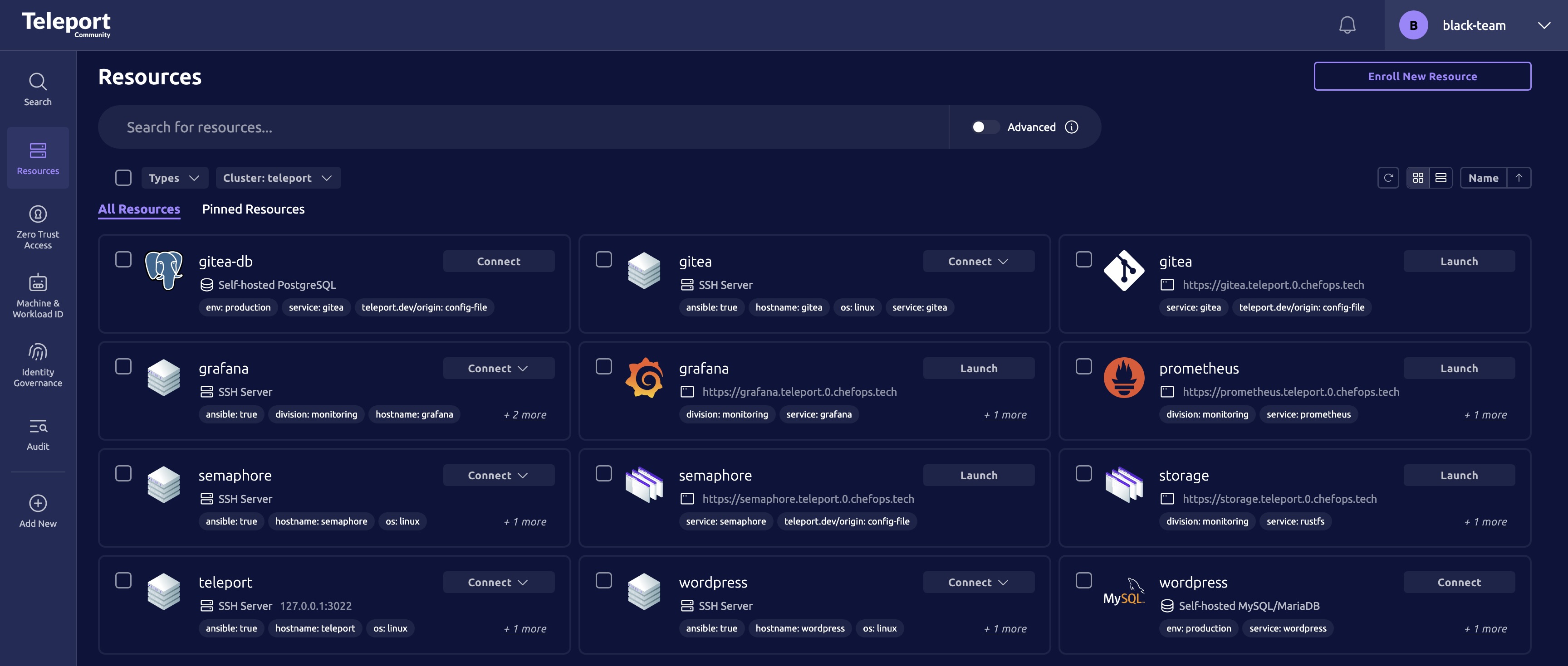
We’ve had Teleport in our infrastructure before but never integrated as much as we did this year. Teams probably never used this, but database (mariadb & postgresql) access was accessible through it.
Trust Cluster
The branch cluster was set up so it connected back to the main ChefOps Teleport via a Trust Cluster. This allowed anyone (employees, blue & red team) with access to the corp Teleport to connect directly into the branch.

Teleport goes through HAProxy on pfSense which caused issues with Teleport TLS routing, so we just port forwarded 8443 to Teleport.
This was also the issue preventing tsh from running over the firewall on the default teleport.X.chefops.tech:443
Remote Desktop
They’ve had some issues with IPv6 and Teleport remote Windows desktop. In an inject teams needed to configure this themselves.
- https://github.com/gravitational/teleport/issues/28635
- https://github.com/gravitational/teleport/blob/master/lib/srv/desktop/discovery.go#L283
Red Team
Day one of regionals the red team targeted Teleport a lot. They would go in and delete the configuration files and then replace the webpage with a red screen.
root@teleport ~# cat /etc/teleport.yaml
HACKED_BY_RED_TEAM
Wordpress
I personally did not work on this, but securing it was an exercise in futility.
Injects
Qualifiers
Preliminary Assessment
This inject is pretty standard and usually seen every year. Perform an inventory the environment and report on any security findings.
One of the blue teams asked a question on how to properly find infrastructure in large environments (IPv6 /64 subnets). It’s hard if you’re just nmaping the entire environment. Start by monitoring network traffic going through the firewall, and which systems are connected to each other. Check systems sending logs to Grafana, what’s connected to Teleport, AD clients, or Firewall DNS.
Remember that the infrastructure in the beta test is not the same as what’s in qualifiers. Don’t submit IPv4 addresses for servers when they are in a subnet that only has IPv6.
Wordpress TLS
This inject was looking for two things:
- HTTPS redirect setup, ideally it was implemented on the server, but it could have also been done in HAProxy on pfSense.
- TLS set up on Wordpress. It was already being terminated by pfSense, but inside the network it was not being encrypted.
Falco Punch
This inject was just looking for some alerting when there was a connection over port 4444. A great example of this would be the following rule, and it’s just a modified version of the default rule Disallowed SSH Connection Non Standard Port.
- macro: outbound
  condition: >
    ((evt.type = connect or
      (evt.type in (sendto,sendmsg) and
       fd.l4proto != tcp and fd.connected=false and fd.name_changed=true)) and
     (fd.typechar = 4 or fd.typechar = 6) and
     (fd.ip != "0.0.0.0" and fd.net != "127.0.0.0/8") and
     (evt.rawres >= 0 or evt.res = EINPROGRESS))

- rule: Connection over port 4444
  desc: Connection over TCP port 4444
  condition: >
    outbound
    and fd.l4proto=tcp
    and fd.sport = 4444
  output: Connection over port 4444 | ...
  priority: CRITICAL
  tags: [host, container, network, process]
Once the rule is loaded test the functionality with a callout on port 4444.
{
  "hostname": "ip-172-31-14-211",
  "output": "18:14:09.299361738: Critical Connection over port 4444 | ...",
  "output_fields": {
    "evt.type": "connect",
    "proc.aname[2]": "su",
    "proc.cmdline": "curl https://infrasec.sh:4444",
    "proc.cwd": "/etc/falco/",
    "proc.exe": "curl",
    "proc.exepath": "/usr/bin/curl",
    "proc.name": "curl",
    "proc.pname": "bash",
    "proc.sname": "sudo",
    "proc.tty": 34817,
    "user.loginuid": 65536,
    "user.name": "root",
    "user.uid": 0
  },
  "priority": "Critical",
  "rule": "Connection over port 4444",
  "source": "syscall",
  "tags": ["container", "host", "network", "process"]
}
Additionally, Semaphore could be used to update the rule on all connected Linux systems running Falco.
Regionals
Someone on one of the blue teams said to make harder injects, so the black team helped out a little. Overall, we’re also trying to reduce the amount of “AI”-able injects, so naturally they lean more technical.
Exposed Metrics
This inject asked teams to identify services with exposed Prometheus metrics endpoints. It involved identifying, documenting, and resolving the issues without disrupting Alloy’s ability to collect metrics.
For most applications it was as simple as moving the metrics endpoint from 0.0.0.0 to 127.0.0.1.
Fixing Gitea was harder since it was attached to the main http interface, but it could be locked down with authentication.
For example Teleport exposes metrics on a different port, but it reveals some information you probably don’t want exposed to anyone with network access.
curl http://10.3.0.128:3000/metrics
backend_requests{component="cache",range="false",req="/roles/semaphore-admin"} 3
backend_requests{component="cache",range="false",req="/roles/support"} 3
backend_requests{component="cache",range="false",req="/roles/support-linux"} 3
backend_requests{component="cache",range="false",req="/roles/support-windows"} 3
backend_requests{component="cache",range="false",req="/roles/system-admin"} 3
remote_clusters{cluster="branch-ock"} 1
When grading the majority of teams did not understand what this inject was asking or implemented some completely different change. Only one team identified a service with exposed Prometheus metrics, and no teams remediated the issues.
Teleport Upgrade
This was my personal favorite inject. On the surface, it seems pretty simple but it can have some downstream effects. The inject required the patching of CVE-2025-49825 and the upgrade to the latest Teleport major version (v18).
Patching and upgrading is simple: update the teleport apt source file and then apt update teleport.
Additionally, the inject asked for the output of two tctl commands to verify the availability of the cluster.
Here is the catch...
When upgrading a system make sure to complete all the steps, especially for compatibility. Teleport only supports one major version behind, so upgrading the cluster to v18 would break Wordpress for example since it was running v16. The one downside with this was if you ever redeployed one of the services it would revert to the original version, but the black team was happy to assist with fixing that.

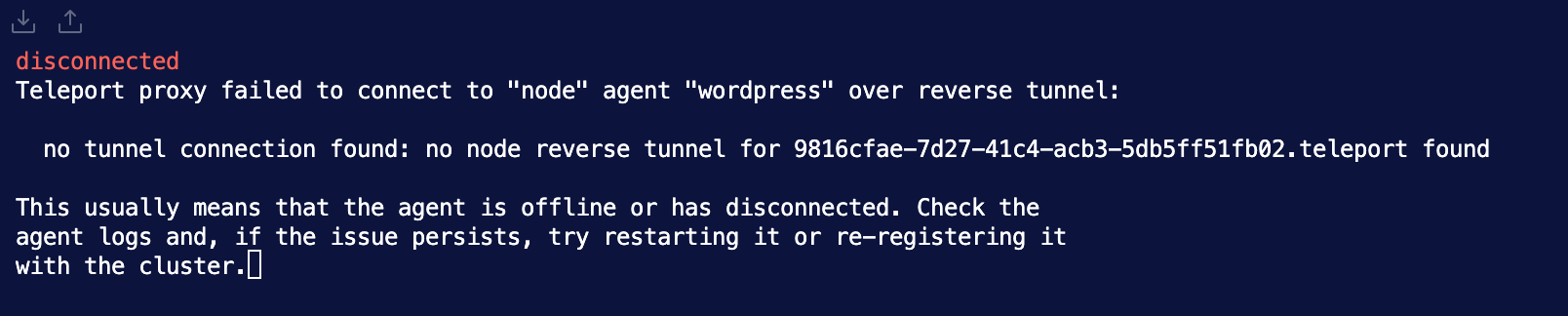
Windows in Teleport
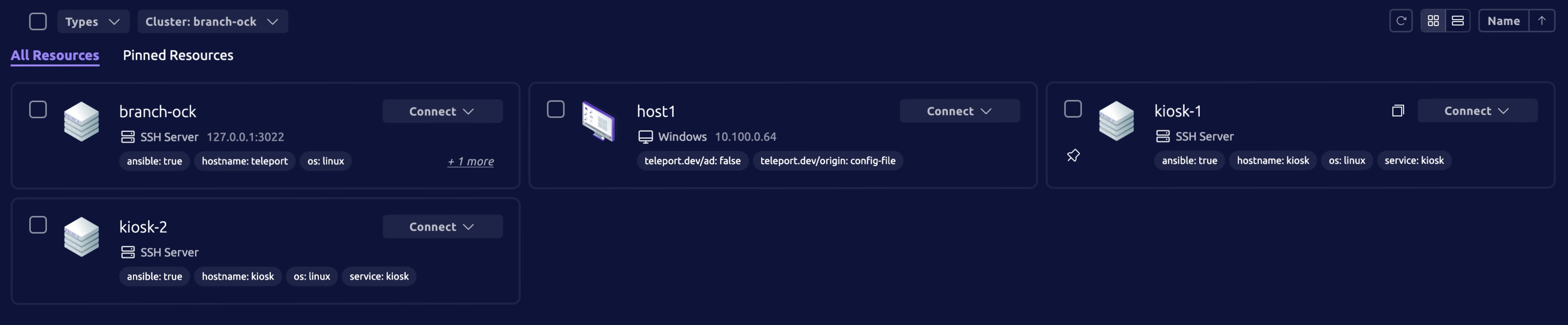
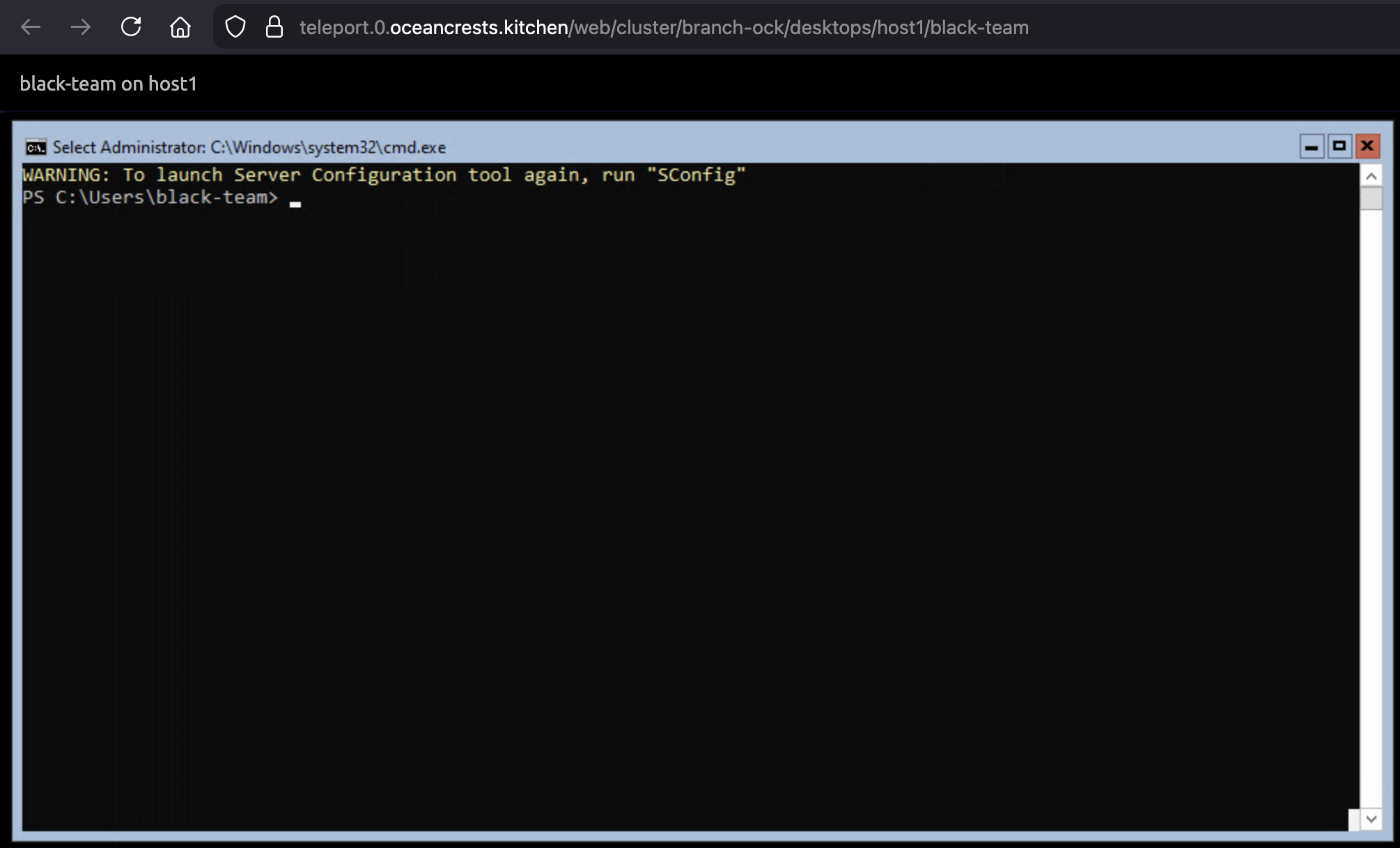
Teams had to integrate Teleport with the branches’ Active Directory domain to allow remote desktop access. A few teams showed the Windows server icon (first image) in Teleport but none showed proof that it was working. All you need to do is follow the documentation and figure out how to get the binary onto the cdn server since it only has an IPv4 address. (webserver, git, NAT64, etc.)
Kiosk Provisioning
At the start of day two all teams got a new kiosk server installed in their environments. Teams were tasked with setting it up with the standard suite of tools (Alloy, Falco, & Teleport) as well as setting up the same content. To successfully implement it was pretty much CTRL+C, CTRL+V between the hosts.
Remember when submitting injects make sure to show it working not just it being installed.
Misc
- Always read “The Packet” since things change year to year.
- Reduce the quantity of black team assistance requests. The fee increases exponentially
Stats
These are based on the regional survey sent out at the end of day two
- This was the first competition for 52.6% of students
- 77% of competitors brought and used physical materials
- Top new infrastructure to teams
- Keycloak
- Teleport
- IPv6
- Top infrastructure teams want to see
- Kubernetes
- Palo Alto
- Teleport
- The teams want to see less of
- IPv6
- Teleport
- Windows
And finally, here is your annual red team hacking video
Share your Work
If you competed this year and have public resources on your experience, share a link with me. I would love to link to it from here.